What is a task execution timer
A task execution timer is a built-in tool in the PayTask service that allows you to accurately track the time spent on completing a specific task. This is an indispensable tool for working time tracking and precise piece-rate salary calculation.
The timer automatically saves the execution time and, when stopped, adds it to the "Minutes" field of the task, which simplifies task accounting and payment calculation for completed work. Important: when stopping the timer, the time is automatically added to the already entered value in the "Minutes" field, rather than replacing it.
How to use the timer
The timer is available on the task execution page next to tasks that have Payment per minute of task execution greater than zero, as well as on the task creation page. To work with the timer, follow these steps:
- Open the timer — click the ⏱️ Timer button next to the desired task.
- Start counting — click the ▶️ Start button to begin timing.
- Pause if needed — use the ⏸️ Pause button if you need to temporarily stop the timer (e.g., for a break).
- Resume counting — after pausing, click ▶️ Start again to continue.
- Stop the timer — click the ⏹️ Stop button to finish timing.
- Close the timer — click the ✖️Close to close the timer.
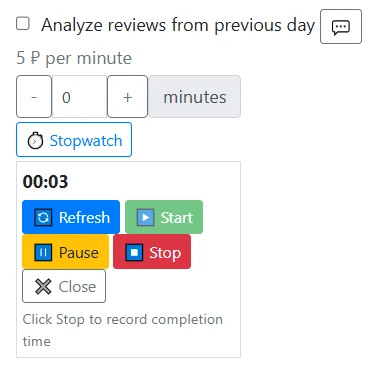
task page with an open timer, visible Start, Pause, Stop buttons and displayed time
Automatic time accounting
When the timer is stopped (click the ⏹️ Stop button), the system automatically:
- Calculates the total execution time of the task
- Rounds the time up to whole minutes
- Adds this time to the "Minutes" field of the task
- Saves the data for piece-rate salary calculation
This allows you to accurately account for the time spent on completing a task without manually entering the number of minutes.
Timer states
The timer can be in three states:
- Stopped (stopped) — the timer is not running, time is zero
- Running (running) — the timer counts time in real time
- Paused (paused) — the timer is paused, but accumulated time is saved
You can use the 🔄 Refresh button to synchronize the timer's state with the server if you opened the page on multiple devices or browser tabs. The timer will continue to work even when switching devices — simply open the task page on a new device and click the "Refresh" button to synchronize the state.
Advantages of using the timer
Using the task execution timer in the task manager of PayTask provides the following advantages:
- Accurate work time tracking — automatic counting without manual entry
- Fair salary calculation — payment is based on actual time spent
- Performance monitoring — ability to track how much time various tasks take
- Ease of use — simple interface with clear control buttons
- Reliability — data is saved on the server, the timer will continue to work even after page refresh or device change
Features of operation
Important points when working with the timer:
- The timer works independently for each task — you can start multiple timers for different tasks
- Time is saved on the server — when refreshing the page or switching devices, the timer will restore its state and continue counting
- When stopping the timer, the time is automatically added to the already entered value in the "Minutes" field
- The timer displays time in the format MM:SS (minutes:seconds)
Using the timer is a simple and effective way to keep working time accounting and ensure accurate piece-rate salary calculation in the PayTask system.